

The Claude Code SEO & GEO Audit Skill Stack
The exact 13 Claude Code skills, 6 Python crawlers and 3 MCP configs we use to run agentic SEO & GEO audits in production. Copy-paste ready, fully documented, free to download.

With 22 years of IT experience, Roy leads Perel Web Studio with unwavering passion for creating digital solutions that drive real results. The only difference between a good and bad web agency? Passion.
We rebuilt our agency’s entire SEO audit process from scratch on top of Claude Code and the Model Context Protocol. What used to be a week of manual work in Screaming Frog, Lighthouse, Google Search Console and a dozen spreadsheets now runs as a single agentic command — and the output is something I’m comfortable sending to a paying client.
This article documents the full stack: 13 Claude Code skills, 6 Python crawlers, and 3 MCP server configurations. Every file is open and downloadable below — no email required to read this page, only if you want the code on your machine.
The hardest part wasn’t writing the skills. It was figuring out which MCP servers actually work, which APIs give reliable data, and which approaches don’t hallucinate. We tested dozens of setups over months before landing on this stack.
If you’d rather have us run the whole thing on your website — full report, prioritised findings, 30-minute walkthrough — we now offer it as a fixed-price service: €300 AI agentic audit, delivered in 48 hours.
Why most “AI SEO audits” are useless
If you’ve Googled “AI SEO audit” recently, you’ve seen the pattern: a free tool that asks ChatGPT to “audit this URL” and returns a glossy report. The model never crawled your site. It made up your page speed, fabricated technical issues, invented keyword positions. The output is well-written nonsense.
Our rule, learned the hard way:
Python scripts collect facts. AI only writes prose.
Every number that ends up in a Perel Web Studio audit can be traced back to a CSV or JSON file produced by a script that actually hit the URL, parsed the HTML, or called a real API. The LLM’s job is to read those files, prioritise the findings by business impact, and write the executive summary. That’s the only way to make an AI-generated audit defensible.
This split is the architecture the rest of this article describes.
What the agentic audit covers
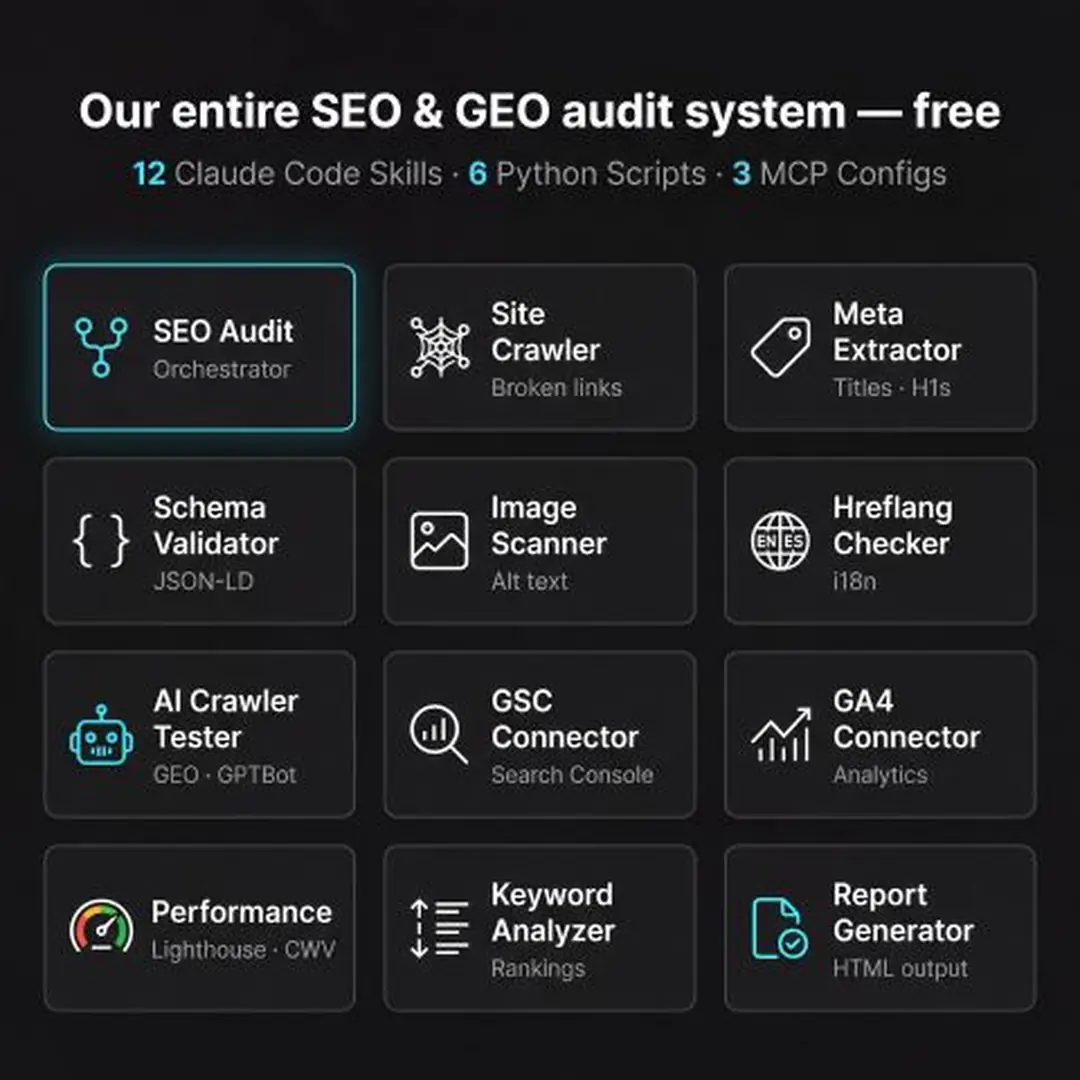
Each of these runs in parallel as a separate Claude Code skill:
- Site crawl & broken links — every URL in the sitemap, HTTP status of every internal link
- Meta tags & content — title, description, H1/H2, word count, canonical, OG tags
- Schema / JSON-LD — every structured-data block extracted and classified
- Image alt-text coverage — per page and overall
- Hreflang verification — every alternate URL tested for a live 200
- AI crawler access — GPTBot, ClaudeBot, PerplexityBot, OAI-SearchBot, Google-Extended, Bingbot…
- Live Google Search Console data — clicks, impressions, top queries, top pages, device split
- Live Google Analytics 4 data — channel groups, landing pages, devices
- Core Web Vitals via Chrome DevTools MCP — LCP, INP, CLS, with the actual blocking element identified
- Keyword rank tracking — imported from CSV exports (SEMrush, Mangools, Ahrefs)
- PageSpeed Insights — field data from CrUX, lab data from Lighthouse
The orchestrator then reads all of these files and compiles a single prioritised report.
The architecture in one diagram
                 ┌────────────────────────────────┐
                 │  /seo-audit  (orchestrator)    │
                 └────────────┬───────────────────┘
                              │ runs all in parallel
              ┌───────────────┴──────────────────────┐
              ▼                                      ▼
   ┌─────────────────────┐              ┌──────────────────────┐
   │  Python crawlers    │              │  MCP-connected data  │
   │  (machine-verified) │              │  (live APIs)         │
   ├─────────────────────┤              ├──────────────────────┤
   │  crawl.py           │              │  Google Search       │
   │  meta.py            │              │  Console             │
   │  schema.py          │              │  Google Analytics 4  │
   │  images.py          │              │  Chrome DevTools     │
   │  hreflang.py        │              └──────────────────────┘
   │  ai_crawlers.py     │
   └──────────┬──────────┘
              │ outputs CSV + JSON
              ▼
   ┌──────────────────────────────────────────────────────────┐
   │  Claude reads the files and writes the final report      │
   │  (every claim must cite a source file)                   │
   └──────────────────────────────────────────────────────────┘
The 13 skills, one by one
Each skill is a standalone SKILL.md file. Drop them into ~/.claude/skills/ and Claude Code picks them up automatically. The orchestrator skill (seo-audit) coordinates the others.
1. seo-audit — the orchestrator
The main entry point. One command kicks off all 6 Python crawlers in parallel, pulls live analytics from GSC and GA4, runs the performance audit, then compiles the final report.
/seo-audit yourdomain.com https://yourdomain.com/sitemap.xmlIt enforces the scoring weights we use across all our audits: 22% technical SEO, 23% content quality, 20% on-page, 10% schema, 10% performance, 10% AI search readiness, 5% images.
2. seo-audit-crawl — site crawler
Walks the sitemap, checks the HTTP status of every URL, follows every internal link, and writes a CSV of broken links with the page they were found on. No JavaScript execution — same view as a search engine that doesn’t render JS.
Output:
{domain}_crawl.csv— every URL with its status code{domain}_broken_links.csv— broken links + the page they were found on
3. seo-audit-meta — meta tag extractor
Extracts title, meta description, H1, all H2s, word count, canonical URL, and Open Graph tags from every page. Automatically flags:
- Missing or empty
<title> - Title too short (under 30 chars) or too long (over 60 chars)
- Duplicate titles across pages
- Missing meta description
- Pages with multiple H1s
- Pages with fewer than 300 words
4. seo-audit-schema — JSON-LD extractor
Pulls every <script type="application/ld+json"> block from every page, validates it, and classifies the schema type. Common ones: Organization, Product, BlogPosting, BreadcrumbList, FAQPage, Article, LocalBusiness.
Output: a per-page count, a per-type total, and a list of parse errors. Schema gaps map directly to missed rich-result opportunities.
5. seo-audit-images — alt-text audit
Scans every page for <img> tags and classifies each: good alt, empty alt, missing alt. Skips tracking pixels (1×1 px), inline SVG icons, and data: URIs automatically — those don’t need alts.
Output: per-page coverage percentage and an overall stat. We’ve found that sites think they’re at 95% coverage and turn out to be at 60% once you filter the noise out.
6. seo-audit-hreflang — multilingual verification
This one matters for any multilingual site. For each page, it extracts every <link rel="alternate" hreflang="…"> tag, then actually fetches each alternate URL to verify it returns 200. Catches three common bugs:
- Broken alternate URLs (the page they point to doesn’t exist anymore)
- Missing
x-default - Redirect loops between language versions
7. seo-audit-ai-crawlers — GEO accessibility test
This is the one that gets the most attention now that AI search is real. Tests whether each of these crawlers can access your site:
GPTBot · ClaudeBot · PerplexityBot · OAI-SearchBot · Google-Extended · Googlebot · Bingbot · applebot · cohere-ai
Also checks robots.txt for directives that block them, and the presence of /llms.txt. The output tells you exactly which AI assistants can see your content — and therefore which ones can cite you in their answers.
8. seo-audit-gsc — Google Search Console (live)
Connects via the GSC MCP server and pulls:
- Total clicks, impressions, CTR, average position
- Top 50 queries (with delta vs. previous period)
- Top 50 pages
- Device split (mobile / desktop / tablet)
- Country split (top 20)
- Daily trends
No CSV exports, no logging into the GSC UI. The data is live.
9. seo-audit-ga — Google Analytics 4 (live)
Connects via the Analytics MCP server and pulls:
- Sessions, users, pageviews, bounce rate by channel group
- Top 20 landing pages with engagement metrics
- Device category split
- Geography (top 20 countries)
Correlating GSC queries with GA4 landing-page engagement is where most of the actionable insight comes from. The two scripts are designed to be read together.
10. seo-audit-performance — Lighthouse + Chrome DevTools
Uses the Chrome DevTools MCP server to run a full Lighthouse audit and a performance trace on your key templates. Doesn’t just give you the score — flags the actual LCP element, the longest INP interaction, and which third-party script caused it.
Thresholds we flag: LCP > 2500ms, INP > 200ms, CLS > 0.1.
11. seo-audit-keywords — rank tracking
Imports ranking CSVs from Mangools, SEMrush, Ahrefs or SEOcrawl and identifies:
- Keywords at positions 4–10 (one push from top 3)
- Keywords at positions 11–20 (one push to page 1)
- Keywords at position 101+ with high search volume (the “you should be ranking but you’re not” bucket)
- Cases where the wrong page is ranking for a keyword
12. seo-audit-pagespeed — PageSpeed Insights API
Pulls field data from the Chrome User Experience Report (CrUX) for your top URLs — so you see real-world Core Web Vitals from actual visitors, not just lab numbers. Free Google API, no MCP needed.
13. seo-audit-content — content-quality pass
The only skill that uses the LLM for evaluation, but constrained to your own content: reads the extracted body text page by page, scores it on the E-E-A-T framework (Experience, Expertise, Authoritativeness, Trustworthiness) plus AI-citation readiness, and flags thin pages.
This is the last skill that runs — and even here, every score must cite specific sentences from the page.
Get the full stack
The 13 SKILL.md files, the 6 Python scripts, the 3 MCP configurations and a setup README — all in one zip. Drop one email + your company name to receive the link by email, or grab it instantly below.
Download the full stack
13 skills · 6 Python scripts · 3 MCP configs. Ready to use.
The downloads are unlocked below — a recap email has just been sent to the address you provided.
Downloads
Download all (zip)Or download individual files
Rather have us run it for you?
We run this exact stack on any website for €300 — full report delivered in 48 hours, with a 30-minute walkthrough included.
The 6 Python scripts in 10 lines each
Each of the technical skills is backed by a small Python script. We deliberately kept them small (~200 lines each, standard library only — no requests, no BeautifulSoup) so they’re easy to read and audit.
| Script | Purpose | Output |
|---|---|---|
crawl.py | Crawl every sitemap URL, follow internal links, check HTTP status | crawl.csv, broken_links.csv |
meta.py | Extract title, description, H1/H2, word count, canonical, OG tags | meta.csv, meta_issues.csv |
schema.py | Pull every JSON-LD block, classify type, count per page | schema.csv, schema_summary.json |
images.py | Per-image alt-text status, filtering tracking pixels and SVG icons | images.csv, images_stats.json |
hreflang.py | Verify every hreflang alternate returns 200 | hreflang.csv, hreflang_summary.json |
ai_crawlers.py | Test 9 AI/search crawler user agents against the homepage | ai_crawlers.csv, ai_crawlers_summary.json |
Everything else — file format, error handling, parallelism — is in the bundle.
The 3 MCP server configurations
// ~/.claude/settings.json (excerpt)
{
  "mcpServers": {
    "gsc": {
      "command": "npx",
      "args": ["-y", "gsc-mcp-server"]
    },
    "analytics-mcp": {
      "command": "npx",
      "args": ["-y", "analytics-mcp-server"]
    },
    "chrome-devtools": {
      "command": "npx",
      "args": ["-y", "chrome-devtools-mcp"]
    }
  }
}
Authentication for GSC and Analytics is handled once via OAuth and the tokens are auto-refreshed. The first audit is the only one that asks you to authenticate. The bundle includes the exact OAuth steps for each — including the gotchas we hit.
How to run a full audit
# in any directory, with Claude Code installed and the skills dropped in:
mkdir -p ./reports/yourdomain
cd ./reports/yourdomain

claude
> /seo-audit yourdomain.com https://yourdomain.com/sitemap.xml
The orchestrator runs all 11 audits in parallel. On a 200-page site it takes 6–10 minutes end to end. The final report is written to ./reports/yourdomain/REPORT.md.
For multi-site portfolios you can pass multiple domains in one call:
> /seo-audit site1.com sitemap1.xml site2.com sitemap2.xmlWhat the final report looks like
The output is a single Markdown report with:
- Executive summary — three sentences, score (out of 100), top three priorities
- Scorecard — the seven category scores with their weights
- Critical issues — each one with: what we found, where, why it matters, the specific fix
- Quick wins — fixes that take under an hour
- Strategic recommendations — longer projects, ranked by business impact
- Appendix — links to every raw CSV/JSON file produced by the crawlers
Every claim cites a source file. If the report says “23 pages have missing meta descriptions”, you can open meta_issues.csv, filter on the issue, and see all 23 URLs.
Want this run on your site instead?
Setting up Claude Code, MCP servers, OAuth tokens and the 13 skills isn’t a 10-minute job. If you’d rather we just run the whole stack on your site and hand you the report, that’s exactly the €300 AI Agentic Audit service.
- €300, fixed — no scope creep, no upsells in the report
- 48-hour turnaround from booking
- PDF + HTML report + 30-minute walkthrough call
- The fee is credited against any follow-up implementation work
It’s the same stack documented in this article, run on your domain, with the human review on top.
Why we open-sourced it
Three reasons.
1. It’s the right thing to do. This stuff isn’t a trade secret. It’s the rigorous application of well-known SEO principles, automated. If someone with a small site downloads the bundle and runs their own audit, that’s a win — and one fewer site polluted by hallucinated AI advice.
2. Curating the stack is the value, not running it. The hard part wasn’t writing the scripts. It was figuring out which MCP servers don’t break, which APIs return reliable data, and which prompt structures keep the LLM honest. That work — months of testing — is baked into the bundle. Anyone who downloads it skips that pain.
3. It generates the right kind of inbound. Founders and in-house marketers who read this article and download the bundle are already half-qualified leads for our other services. If they enjoy the stack, they’ll come back when they need a partner for the implementation.
So: download it, use it, share it. And if you want it run on your site by the people who built it, we’re one email away.
Ready to Transform Your Online Presence?
Let's discuss how we can help your business grow with a high-performing website
Roy Perelgut
Founder & Digital Strategist
With 22 years of IT experience, Roy founded Perel Web Studio with one core belief: passion is what separates a good web agency from a bad one.
Passionate about creating digital solutions that drive real results, he leads a team of 6 from Brussels, collaborating with talented developers in Sri Lanka, delivering projects that achieve #1 Google rankings and multiply leads.
His approach combines technical excellence, sharp SEO strategy, and an uncompromising commitment to every client's success.