

How to Run OpenClaw 24/7 Without Breaking the Bank: Eliminate Rate Limits + Cut Costs by 80%
Running OpenClaw 24/7 costs $800-1500/month with API models alone. We cut that to $5-10/day while eliminating rate limits. Learn how we balance Claude Max subscription with Kimi K2.5 API to make OpenClaw affordable and reliable.

With 22 years of IT experience, Roy leads Perel Web Studio with unwavering passion for creating digital solutions that drive real results. The only difference between a good and bad web agency? Passion.
In short: Running OpenClaw 24/7 used to mean choosing between expensive API models ($800-1500/month) or frustrating rate limits. We found a third way: balance Claude Max subscription with Kimi K2.5 API overflow. Result: $5-10/day cost, zero rate limits, 80-90% savings. Full automation via Smart Model Manager.
Update — February 17, 2026
What was written above was accurate at the time of publishing. However, the situation has evolved significantly since then.
Anthropic is continuously changing its blocking and rate limiting rules — in part to prevent the use of Max and Pro subscription tokens in third-party software like OpenClaw. Based on their official policy, using Claude subscription tokens in third-party applications is not permitted.
Because of this, the specific approach described in this article may no longer work as described for you. Everyone should find their own best balance depending on how they use OpenClaw.
Our current approach at Perel Web Studio (as of February 2026): we now run OpenClaw on Kimi K2.5 as the main orchestrator, and for any heavy-lifting task — SEO work, audits, development, or any other token-intensive process — we explicitly instruct OpenClaw to call Claude Code via bash.
Here’s what that means in practice: when Kimi-powered OpenClaw receives a complex task, instead of processing it directly, it runs a bash command that calls Claude Code, which does all the heavy lifting locally. Claude Code then reports the result back, and Kimi/OpenClaw orchestrates the output and responds to the user. The user gets Claude’s full intelligence for demanding tasks, while Kimi handles all the lightweight orchestration in between.
This setup works because Claude Code runs outside Anthropic’s subscription usage restrictions — it’s billed separately via API or operates under its own usage model. The result is a highly capable, cost-efficient pipeline where the right model handles the right job.
If you’re looking to set up AI-powered automation in a sustainable way, learn more about our AI services at Perel Web Studio.
When Your OpenClaw Agent Suddenly Goes Dumb
It started with confusion. My OpenClaw agent — the one that had been running flawlessly for weeks, handling WhatsApp messages, automating tasks, coordinating my team — suddenly started giving bizarre responses. Not errors. Just… stupid answers. Like talking to a completely different AI.
“Which model are you?” I asked.
The response was incoherent. Something about being helpful. No model identification.
I checked the logs. No errors. I restarted the gateway. Same behavior. I spent hours debugging what I thought was a configuration issue, a memory problem, maybe a corrupted state file.
Then it hit me: rate limiting.
The Silent Killer Nobody Warns You About
Here’s what caught me off guard: when you hit rate limits on a Claude Max plan, you don’t get an error message. Your agent doesn’t crash. Instead, it silently degrades. The model stops responding intelligently, falls back to generic responses, or just breaks in subtle, maddening ways.
No notification. No warning. No “you’ve used 90% of your quota.” Just sudden stupidity.
For those of us running AI agents through tools like OpenClaw, this is devastating. You’re paying for a Max subscription, you expect reliability, and instead you get silent failures that waste hours of debugging time.
What I Found in the Logs
After digging through auth-profiles.json, I found the smoking gun:
"anthropic:manual": {
  "errorCount": 5,
  "cooldownUntil": 1707523200000
}
Five errors. A cooldown timer. And zero visibility into any of it.
The Real Numbers Behind Claude Max Rate Limits
Claude Max plans have hard limits that are poorly documented:
- 5-hour rolling window for usage bursts
- Weekly ceiling: 15–35 hours for Opus, 140–280 hours for Sonnet
- Shared accounts multiply the pain: 4 developers on 2 accounts = constant rate limits
When you’re running an always-on AI agent that handles messages from WhatsApp, Telegram, and other channels, these limits get exhausted fast. And you only find out when your agent starts acting drunk.
What We Tried First (And Why Each Approach Failed)
Before landing on our current solution, we went through three iterations. Each taught us something important about OpenClaw token management.
Attempt 1: Reactive Error-Based Switching
Our first approach was simple: monitor for Anthropic errors, and when they occur, switch to a fallback model.
if [[ "$ANTHROPIC_ERRORS" -ge 2 ]]; then
    switch_to_fallback
fi
Why it failed: By the time you get errors, the damage is done. Your users have already experienced broken responses. The agent has already failed mid-conversation. You’re always one step behind.
Attempt 2: Cooldown Timestamp Monitoring
We tried monitoring the cooldownUntil timestamp in auth-profiles.json:
cooldown = datetime.fromtimestamp(data['cooldownUntil']/1000)
if cooldown > datetime.now():
    switch_to_fallback()
Why it failed: Cooldowns are reactive, not predictive. They only appear after you’ve been rate limited. Same fundamental problem — responding to failure instead of preventing it.
Attempt 3: Token Counting
We considered tracking actual token usage and estimating when we’d hit limits.
Why it failed: Claude Max limits aren’t purely token-based. They’re based on usage patterns, rolling windows, and opaque internal metrics. Token counting doesn’t map cleanly to rate limit behavior.
The Breakthrough Realization
The feedback was clear: “The auto switch should avoid at all cost a rate limiting on Anthropic, so we should build some margin to make sure never reaching the rate limitations.”
We needed to flip the entire model: instead of reacting to limits, impose our own limits that are stricter than Anthropic’s. If we budget 3h30 of Claude per day and switch before that budget runs out, we’ll never hit their rate limits.
The Solution: Proactive Budget Management for OpenClaw
Instead of reacting to rate limits after they happen, we built a proactive system that:
- Tracks Claude usage in real-time (by time, not tokens)
- Enforces a daily budget with a 10-minute safety margin
- Auto-switches to Kimi K2.5 before hitting limits
- Resets automatically at midnight
- Sends WhatsApp notifications for every model switch
Why Time-Based Tracking Works
Claude Max plans are rate-limited by usage time, not token count. Our system tracks how long Claude has been your active model, giving you predictable daily budgets rather than unpredictable rate limit errors.
Architecture: Three Components, Zero Complexity
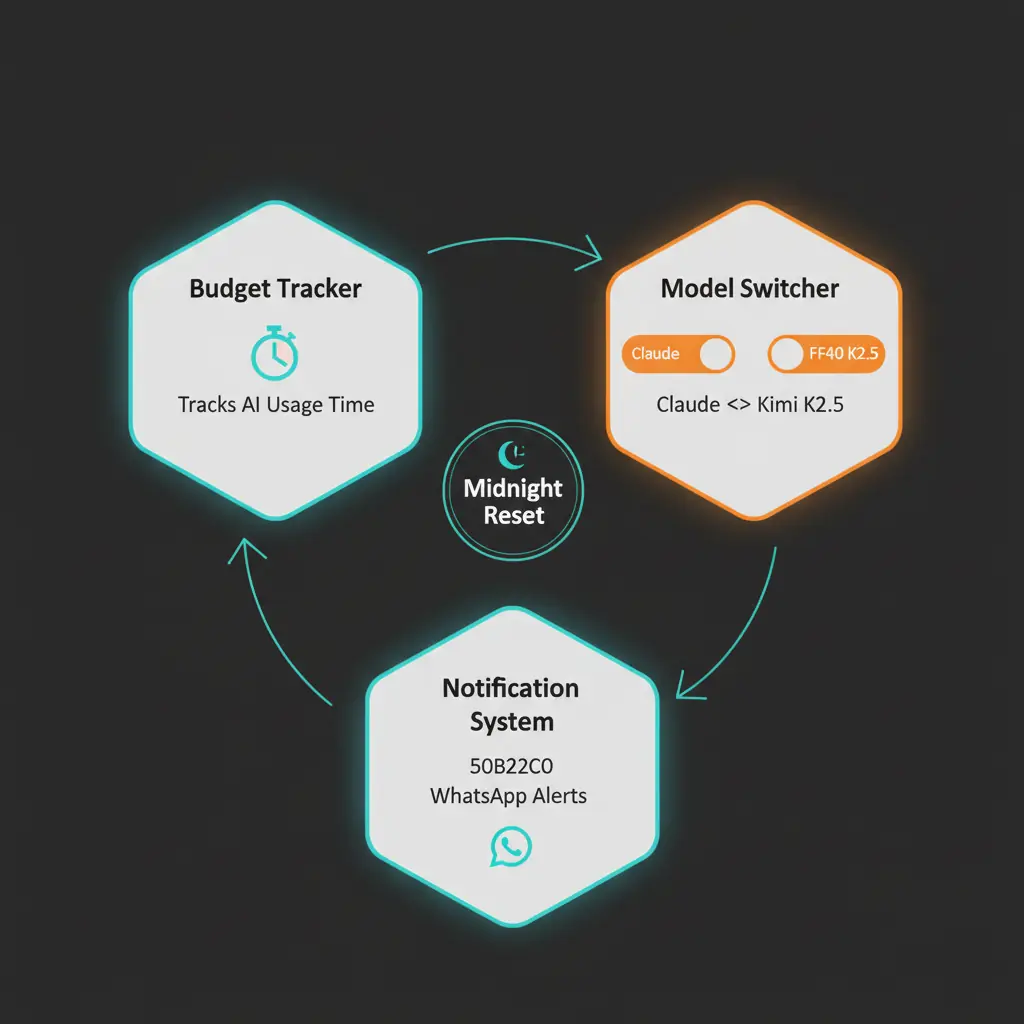
Our Smart Model Manager consists of three components that work together:
┌─────────────────────────────────────────────────────────┐
│                    LaunchAgent (macOS)                   │
│         com.perelbot.model-manager.plist                │
│              Runs at boot, keeps alive                   │
└─────────────────────┬───────────────────────────────────┘
                      │
                      ▼
┌─────────────────────────────────────────────────────────┐
│              smart-model-manager.command                 │
│                                                          │
│  - Checks usage every 60 seconds                        │
│  - Tracks Claude time in state file                     │
│  - Switches models via OpenClaw config                  │
│  - Sends WhatsApp notifications                         │
│  - Resets budget at midnight                            │
└─────────────────────────────────────────────────────────┘
                      │
                      ▼
┌─────────────────────────────────────────────────────────┐
│               model-manager.command                      │
│                                                          │
│  Control interface: start | stop | status | restart     │
└─────────────────────────────────────────────────────────┘
Implementation: Step by Step
1. The State File
We track usage in a simple JSON file that persists across restarts and resets when the date changes:
{
  "date": "2026-02-12",
  "claude_seconds": 7200,
  "budget_exhausted": false
}
2. Budget Configuration
DAILY_BUDGET_SECONDS=$((3 * 3600 + 30 * 60))  # 3h30 = 12,600 seconds
MARGIN_SECONDS=$((10 * 60))                    # 10 min safety margin
EFFECTIVE_BUDGET=$((DAILY_BUDGET_SECONDS - MARGIN_SECONDS))  # 3h20
The 10-minute safety margin ensures we never actually hit Anthropic’s limits. Better to switch 10 minutes early than face a rate limit error mid-conversation.
3. Model Switching Logic
# If Claude is active and budget not exhausted, track usage
if [[ "$CURRENT_MODEL" == *"anthropic"* ]] && [[ "$BUDGET_EXHAUSTED" != "True" ]]; then
    CLAUDE_SECONDS=$((CLAUDE_SECONDS + CHECK_INTERVAL))

    # Check if budget exhausted
    if [[ "$CLAUDE_SECONDS" -ge "$EFFECTIVE_BUDGET" ]]; then
        switch_to_kimi
    fi
fi
4. WhatsApp Notifications for Every Switch
Every model switch triggers a WhatsApp notification so you always know what’s happening:
notify_whatsapp() {
    local message="$1"
    openclaw message send --channel whatsapp -t "$WHATSAPP_SELF" -m "$message"
}
You’ll receive messages like:
- “Switched to Kimi K2.5 (Claude daily budget reached: 3h30)”
- “New day! Auto-switched to Claude Sonnet (3h30 budget available)“
5. Automatic Midnight Reset
At midnight, the system detects the date change and automatically:
- Resets the usage counter to zero
- Clears the
budget_exhaustedflag - Switches back to Claude (if currently on Kimi)
- Sends a notification confirming the reset
if [[ "$STATE_DATE" != "$TODAY" ]]; then
    init_state
    if [[ "$CURRENT_MODEL" == *"openrouter"* ]]; then
        switch_to_claude
    fi
fi
Real-World Proof: The Status Dashboard
Here’s an actual screenshot from our WhatsApp status check, showing the Smart Model Manager running in production:
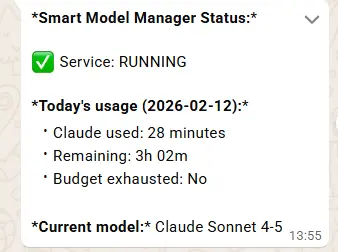
The status shows:
- Service: Running continuously
- Claude used today: 28 minutes
- Remaining: 3h 02m of Claude budget
- Budget exhausted: No
- Current model: Claude Sonnet 4-5
This is the kind of visibility we never had before. No more guessing, no more surprises.
Why Kimi K2.5 Is the Perfect OpenClaw Fallback Model
With Claude on a daily budget, we needed a fallback model. But here’s the thing most people don’t realize: the choice isn’t between Claude, GPT, and Gemini. Those are all premium models with premium pricing. When you’re running an always-on AI agent through OpenRouter, token costs add up fast.
The Real Cost Problem
Let’s be honest about pricing. Models like GPT-4o, Gemini 2.5 Pro, and Claude via API all charge significant per-token fees. We didn’t seriously evaluate them as fallback options because the whole point of the Smart Model Manager is cost optimization. Paying $10–15 per million tokens for a fallback model defeats the purpose.
Our setup works because we balance two strategies:
- Claude Max subscription — Fixed monthly cost, premium quality, but with rate limits
- Kimi K2.5 via OpenRouter — Dirt-cheap API tokens for overflow usage
This is the key insight: you don’t need two expensive models. You need one great model on a subscription and one cheap model for the rest.
Why Kimi K2.5 Blew Us Away
We chose Kimi K2.5 by Moonshot AI, and honestly, it exceeded every expectation. Here’s what surprised us:
- Genuinely smart — It handles complex multi-turn conversations, understands nuanced context, and reasons through problems effectively
- Great at agent tasks — Unlike some cheaper models that fall apart with tool use and structured outputs, Kimi K2.5 handles OpenClaw’s agent workflows smoothly
- Incredibly cheap — At ~$0.90 per million tokens, it’s a fraction of what any premium model costs
The first time we switched to Kimi during a rate limit event, we were bracing for a quality drop. Instead, the agent kept working normally. Our actual reaction: “Oh my god it’s working and he is smart.”
The Numbers That Matter
| Model | Cost (per 1M tokens) | Viable as Always-On Fallback? |
|---|---|---|
| Claude Opus 4.5 (API) | ~$15.00 | No — too expensive |
| GPT-4o (API) | ~$5.00 | No — still too expensive |
| Gemini 2.5 Pro (API) | ~$3.50 | No — adds up quickly |
| Claude Sonnet 4.5 (API) | ~$3.00 | No — use Max subscription instead |
| Kimi K2.5 | ~$0.90 | Yes — perfect for overflow |
In practice, on a heavy day where Claude’s 3h30 budget runs out and Kimi handles the remaining 4–6 hours, we spend roughly $5–10 on Kimi tokens. That’s it. Compare that to running any other model via API for the same duration and you’d be looking at $30–50+.
Our Real Daily Costs
Running OpenClaw in production with this setup, our actual spending looks like this:
- Claude Max subscription: Fixed monthly fee (covers 3h30/day of premium quality)
- Kimi K2.5 overflow: ~$5–10/day on heavy days, $0 on light days
- Monthly Kimi budget: Roughly $150–300 depending on usage intensity
That’s the cost of running a 24/7 AI agent that handles WhatsApp, Telegram, task management, and team coordination. For a business tool this powerful, it’s remarkably affordable.
A Note on Privacy
Kimi is developed by Moonshot AI, a Chinese company. While API keys stay local (OpenRouter handles routing), your prompts and content are processed by Moonshot’s servers. For sensitive workloads, factor this into your threat model. For our general business automation tasks, the trade-off is worth it.
Complete Installation Guide
Step 1: Create the State Directory
mkdir -p ~/.openclaw/logsStep 2: Create the Main Daemon Script
Save this as ~/clawd/scripts/smart-model-manager.command:
#!/bin/bash
# Smart Model Manager: Proactive Claude budget management for OpenClaw

DAILY_BUDGET_SECONDS=$((3 * 3600 + 30 * 60))
MARGIN_SECONDS=$((10 * 60))
EFFECTIVE_BUDGET=$((DAILY_BUDGET_SECONDS - MARGIN_SECONDS))
CHECK_INTERVAL=60
STATE_FILE="$HOME/.openclaw/claude-usage-state.json"
LOG_FILE="$HOME/.openclaw/logs/model-manager.log"
WHATSAPP_SELF="+YOUR_NUMBER_HERE"

mkdir -p "$HOME/.openclaw/logs"

log() {
    echo "$(date '+%Y-%m-%d %H:%M:%S'): $1" >> "$LOG_FILE"
}

notify_whatsapp() {
    openclaw message send --channel whatsapp -t "$WHATSAPP_SELF" -m "$1" 2>/dev/null
}

get_current_model() {
    grep '"primary"' ~/.openclaw/openclaw.json | sed 's/.*: "\([^"]*\)".*/\1/'
}

switch_to_kimi() {
    openclaw config set agents.defaults.model.primary "openrouter/moonshotai/kimi-k2.5"
    openclaw gateway restart
    notify_whatsapp "Switched to Kimi K2.5 (Claude budget reached)"
}

switch_to_claude() {
    openclaw config set agents.defaults.model.primary "anthropic/claude-sonnet-4-5"
    openclaw gateway restart
    notify_whatsapp "New day! Switched to Claude Sonnet (3h30 budget available)"
}

init_state() {
    echo "{\"date\": \"$(date '+%Y-%m-%d')\", \"claude_seconds\": 0, \"budget_exhausted\": false}" > "$STATE_FILE"
}

# Main loop
while true; do
    TODAY=$(date '+%Y-%m-%d')
    STATE=$(cat "$STATE_FILE" 2>/dev/null || echo '{}')
    STATE_DATE=$(echo "$STATE" | python3 -c "import sys,json; print(json.load(sys.stdin).get('date',''))")
    CLAUDE_SECONDS=$(echo "$STATE" | python3 -c "import sys,json; print(json.load(sys.stdin).get('claude_seconds',0))")

    # New day? Reset budget and switch back to Claude
    if [[ "$STATE_DATE" != "$TODAY" ]]; then
        init_state
        CLAUDE_SECONDS=0
        CURRENT_MODEL=$(get_current_model)
        [[ "$CURRENT_MODEL" == *"openrouter"* ]] && switch_to_claude
    fi

    CURRENT_MODEL=$(get_current_model)

    # Track Claude usage time
    if [[ "$CURRENT_MODEL" == *"anthropic"* ]]; then
        CLAUDE_SECONDS=$((CLAUDE_SECONDS + CHECK_INTERVAL))

        if [[ "$CLAUDE_SECONDS" -ge "$EFFECTIVE_BUDGET" ]]; then
            echo "{\"date\": \"$TODAY\", \"claude_seconds\": $CLAUDE_SECONDS, \"budget_exhausted\": true}" > "$STATE_FILE"
            switch_to_kimi
        else
            echo "{\"date\": \"$TODAY\", \"claude_seconds\": $CLAUDE_SECONDS, \"budget_exhausted\": false}" > "$STATE_FILE"
        fi
    fi

    sleep $CHECK_INTERVAL
done
Step 3: Create the Control Script
Save as ~/clawd/scripts/model-manager.command:
#!/bin/bash
PLIST="$HOME/Library/LaunchAgents/com.perelbot.model-manager.plist"
STATE_FILE="$HOME/.openclaw/claude-usage-state.json"

case "${1:-status}" in
    start)
        launchctl bootstrap gui/$UID "$PLIST" 2>/dev/null
        echo "Model Manager started"
        ;;
    stop)
        launchctl bootout gui/$UID/com.perelbot.model-manager 2>/dev/null
        echo "Model Manager stopped"
        ;;
    restart)
        $0 stop; sleep 1; $0 start
        ;;
    status)
        echo "=== Smart Model Manager Status ==="
        launchctl list | grep -q "com.perelbot.model-manager" && echo "Service: RUNNING" || echo "Service: STOPPED"
        [[ -f "$STATE_FILE" ]] && python3 -c "
import json
with open('$STATE_FILE') as f: s = json.load(f)
secs = s['claude_seconds']
print(f'Claude used today: {secs//3600}h{(secs%3600)//60:02d}m')
print(f'Budget exhausted: {s[\"budget_exhausted\"]}')"
        ;;
esac
Step 4: Create the LaunchAgent (macOS)
Save as ~/Library/LaunchAgents/com.perelbot.model-manager.plist:
<?xml version="1.0" encoding="UTF-8"?>
<!DOCTYPE plist PUBLIC "-//Apple//DTD PLIST 1.0//EN"
  "http://www.apple.com/DTDs/PropertyList-1.0.dtd">
<plist version="1.0">
<dict>
    <key>Label</key>
    <string>com.perelbot.model-manager</string>
    <key>ProgramArguments</key>
    <array>
        <string>/Users/YOUR_USERNAME/clawd/scripts/smart-model-manager.command</string>
    </array>
    <key>RunAtLoad</key>
    <true/>
    <key>KeepAlive</key>
    <true/>
    <key>StandardOutPath</key>
    <string>/Users/YOUR_USERNAME/.openclaw/logs/model-manager-stdout.log</string>
    <key>StandardErrorPath</key>
    <string>/Users/YOUR_USERNAME/.openclaw/logs/model-manager-stderr.log</string>
</dict>
</plist>Note: This guide uses macOS LaunchAgent. For Linux servers, you can adapt this to a systemd service or a simple cron-based approach.
Step 5: Make Executable and Start
chmod +x ~/clawd/scripts/smart-model-manager.command
chmod +x ~/clawd/scripts/model-manager.command
~/clawd/scripts/model-manager.command start
Monitoring Your OpenClaw Token Usage
Check your current status anytime:
~/clawd/scripts/model-manager.command statusOutput:
=== Smart Model Manager Status ===
Service: RUNNING
Claude used today: 1h45m
Budget exhausted: False
Cost Analysis: What We Actually Spend
Here’s what running a 24/7 AI agent actually costs with our setup:
| Scenario | Claude Cost | Kimi K2.5 Cost | Daily Total |
|---|---|---|---|
| Light day (3h Claude only) | $0 (Max plan) | $0 | $0 |
| Normal day (3h30 Claude + 3h Kimi) | $0 (Max plan) | ~$3–5 | ~$3–5 |
| Heavy day (3h30 Claude + 6h Kimi) | $0 (Max plan) | ~$7–10 | ~$7–10 |
Our typical monthly breakdown:
- Claude Max subscription: Fixed fee
- Kimi K2.5 via OpenRouter: ~$150–300/month
What it would cost without this system:
- Pure Claude API at Opus rates for the same usage: $1,500+/month
- Pure GPT-4o API: $800+/month
- Pure Gemini Pro API: $600+/month
The Smart Model Manager saves us roughly 80–90% compared to running a premium model purely via API. Claude Max gives us the best quality when we need it most, and Kimi K2.5 keeps the lights on for everything else — at a price that makes 24/7 AI agent operation actually sustainable.
5 Lessons We Learned About AI Token Management
1. Silent Failures Are the Worst Failures
When your AI agent breaks without telling you, you waste hours debugging the wrong thing. Build observability into everything. WhatsApp notifications aren’t optional — they’re essential infrastructure.
2. Proactive Always Beats Reactive
Responding to errors after they happen means your users already had a bad experience. Preventing errors before they occur means seamless service. The 10-minute safety margin isn’t paranoia — it’s insurance.
3. Kimi K2.5 Is a Game-Changer for Cost-Conscious AI Operations
We assumed Claude was irreplaceable. Kimi K2.5 proved us wrong. At ~$0.90 per million tokens, it handles the vast majority of everyday agent tasks — conversations, task management, team coordination — without breaking a sweat. Forget comparing premium models against each other. The real game is pairing a subscription-based premium model with an ultra-cheap API model. That’s where the magic happens.
4. Automate Everything — Especially Model Management
Manual model switching is tedious and error-prone. A daemon that runs 24/7, resets at midnight, and handles every edge case automatically means you focus on actual work instead of babysitting AI infrastructure.
5. Know Your Rate Limits (And Set Stricter Ones)
Anthropic’s rate limits are poorly documented and inconsistently enforced. By imposing our own stricter limits, we never have to guess whether we’re about to hit a wall. Self-imposed constraints give you control.
The Results: Before vs. After

After implementing the Smart Model Manager:
- Zero rate limit errors in production since deployment
- Full visibility into Claude usage via WhatsApp notifications
- Predictable costs with Kimi K2.5 handling overflow traffic
- Peace of mind knowing the system manages itself 24/7
The agent went from “suddenly stupid” to “always reliable.” That’s the difference between reactive firefighting and proactive engineering.
Conclusion: Stop Waiting for Rate Limits to Hit
If you’re running OpenClaw or any AI agent with usage limits, the takeaway is simple: don’t wait for failures — build the guardrails before you need them.
Our Smart Model Manager gives you:
- Predictability — Know exactly how much Claude time you have each day
- Zero rate limit errors — Switch models before hitting limits
- Cost optimization — Use cheaper models for overflow traffic
- Full visibility — Real-time WhatsApp notifications keep you informed
- Total automation — Set it up once and forget about it
The system runs silently in the background, managing your AI budget like a good financial advisor — maximizing value while avoiding costly mistakes.
Want to set up AI automation for your business? We’ve been running OpenClaw in production for weeks and have learned the hard way what works and what doesn’t. Learn about our AI Assistant service or book a free strategy session and let’s talk about how AI agents can transform your workflow.
Built with OpenClaw 2026.2.6, Claude Sonnet 4.5, and Kimi K2.5 via OpenRouter. What started as an afternoon of debugging frustration became a permanent solution that runs our AI infrastructure 24/7.
Ready to Transform Your Online Presence?
Let's discuss how we can help your business grow with a high-performing website
Roy Perelgut
Founder & Digital Strategist
With 22 years of IT experience, Roy founded Perel Web Studio with one core belief: passion is what separates a good web agency from a bad one.
Passionate about creating digital solutions that drive real results, he leads a team of 6 from Brussels, collaborating with talented developers in Sri Lanka, delivering projects that achieve #1 Google rankings and multiply leads.
His approach combines technical excellence, sharp SEO strategy, and an uncompromising commitment to every client's success.